Python Programming Course
Python is a high-level, interpreted, and object-oriented programming language known for its clear syntax and engineering scalability. Created by Guido van Rossum and released in 1991, Python emphasizes code readability, allowing programmers to express operational concepts in fewer lines of code compared to compiled architectures like C++ or Java.
- Interpreted Languange:Python code is executed line by line via an interpreter, making the structural debugging cycle straightforward.
- Dynamical Typed: Variables do not require strict type definitions explicitly; Python evaluates data architectures dynamically at runtime.
- Service Providers: The Kernel bootstraps the core Service Providers. These modules bind various infrastructure engines (database, queue, routing) into the Service Container.
- Cross-Platform Compatibility: Runs natively across Windows, macOS, and Linux system distributions.
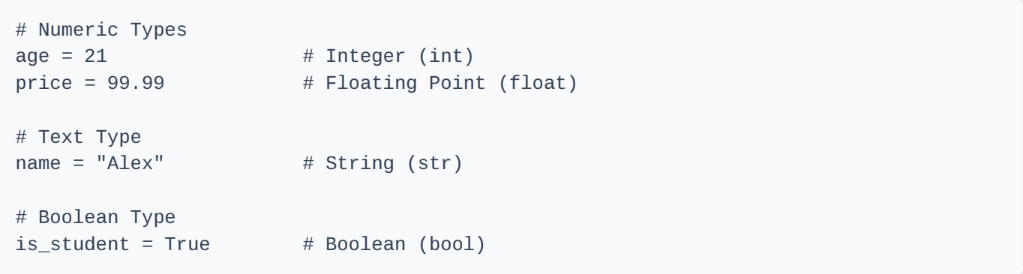
Writing structured Python programs requires understanding fundamental variable components and operational control flows.
2. Control Flow Structures
Conditional structures and iterative loops orchestrate the execution flow of code modules.
Conditional Statements (if-elif-else)if score >= 90:
print("Grade: A")
elif score >= 80:
print("Grade: B")
else:
print("Grade: C")
Loops (for & while)
for i in range(3):
print(f"Iteration index: {i}")
# While Loop: Executing actions while conditional rules persist
count = 0
while count < 3:
print(f"Count: {count}")
count += 1
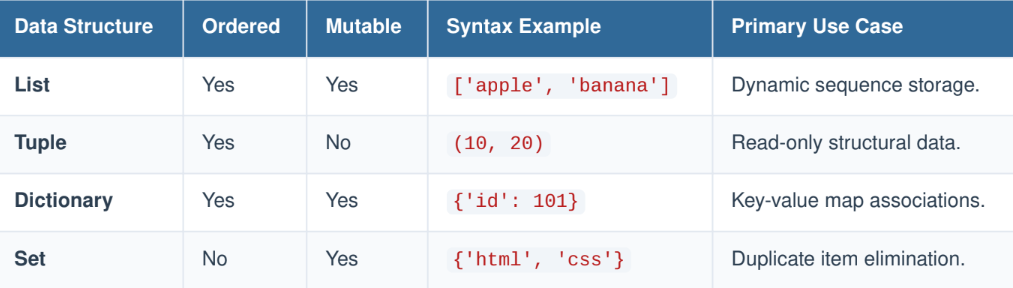
Python features built-in container architectures designed to cluster data records systematically.
programming_languages.append("Go")
# Working with a Dictionary
user_profile = { "username": "coder_99",
"level": 5
}
print(user_profile["username"])
1. Reusable Functions
Functions isolate specific execution paths into reusable program modules.
return width * height
# Invoking the function block
result = calculate_area(5, 10)
print(f"Calculated Area: {result}")
2. Object Oriented Programming (OOP)
Classes and objects map operational code blocks directly to real-world structural entities.
# The Constructor Method
def __init__(self, device_name, operating_system):
self.name = device_name # Instance attribute
self.os = operating_system # Instance attribute
# Custom Instance Method
def boot_up(self):
return f"{self.name} running {self.os} is powering on..."
# Instantiating an Object from the Class blueprint
my_phone = SmartDevice("Pixel 8", "Android")
print(my_phone.boot_up())
Or you can download the Pdf files here.